Votre empreinte IA, installation en un clic
Extension gratuite qui affiche les grammes de CO₂e pour chaque réponse sur ChatGPT, Claude, Gemini, Mistral, Grok, Perplexity et DeepSeek. L'électricité et l'eau des data centers figurent dans les rapports de durabilité cloud ; voici la part par réponse que vous maîtrisez via la longueur, le choix de modèle et vos habitudes. Aucun compte requis. Vos prompts ne quittent jamais votre navigateur.
Installez maintenant — votre premier score CO₂ en moins de 2 minutes
- Compatible ChatGPT, Claude, Gemini, Mistral & Grok
- Niveau CO₂ lisible : faible, modéré ou élevé
- Tableau de bord personnel : tendance 30 jours, modèles utilisés, équivalents
Sans carte bancaire · Sans compte pour essayer · Désinstallation en un clic
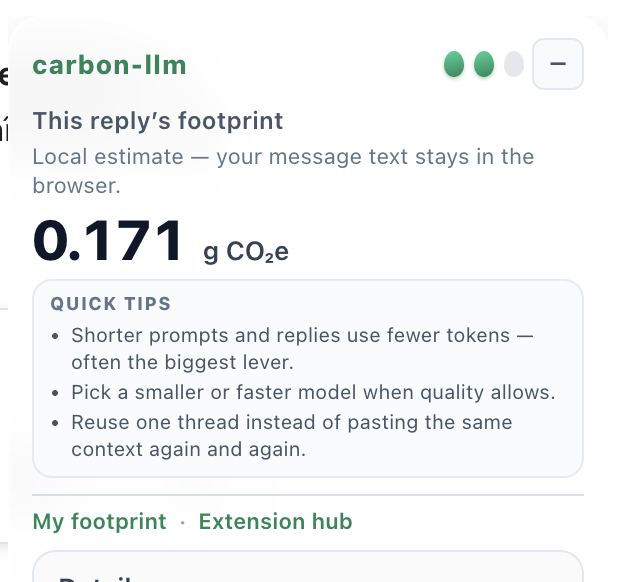
Panneau flottant — dans ChatGPT
Nos chiffres viennent de sources publiques que vous pouvez vérifier
- Université de StanfordRapport AI Index 2026Empreinte mesurée pour 70+ modèles IA
- Mistral × ADEMEÉtude Carbone 4 (2025)Mesure complète du cycle de vie Mistral
- Données climat exploitablesMéthodologie documentéeHypothèses, limites et exports faciles à relire
- Protection des donnéesUn rappel au bon momentSans jamais lire le contenu des prompts
Compatible avec les principales plateformes IA
Un niveau CO₂, à chaque réponse
Chaque réponse IA reçoit un niveau basé sur son estimation de CO₂e : un signal immédiat, plus lisible qu'un chiffre brut seul.
Faible
< 1 g CO₂e
Réponse courte ou modèle légerModéré
1 – 5 g CO₂e
Usage courantÉlevé
> 5 g CO₂e
Réponse longue ou modèle intensifLes seuils sont pédagogiques : ils aident à comparer les réponses et à repérer les usages les plus coûteux.
Voir en action
Panneau flottant — dans ChatGPT
Apparaît après chaque réponse. Niveau d'impact, g CO₂e, équivalents LED / voiture / téléphone, conseil pour réduire les tokens.
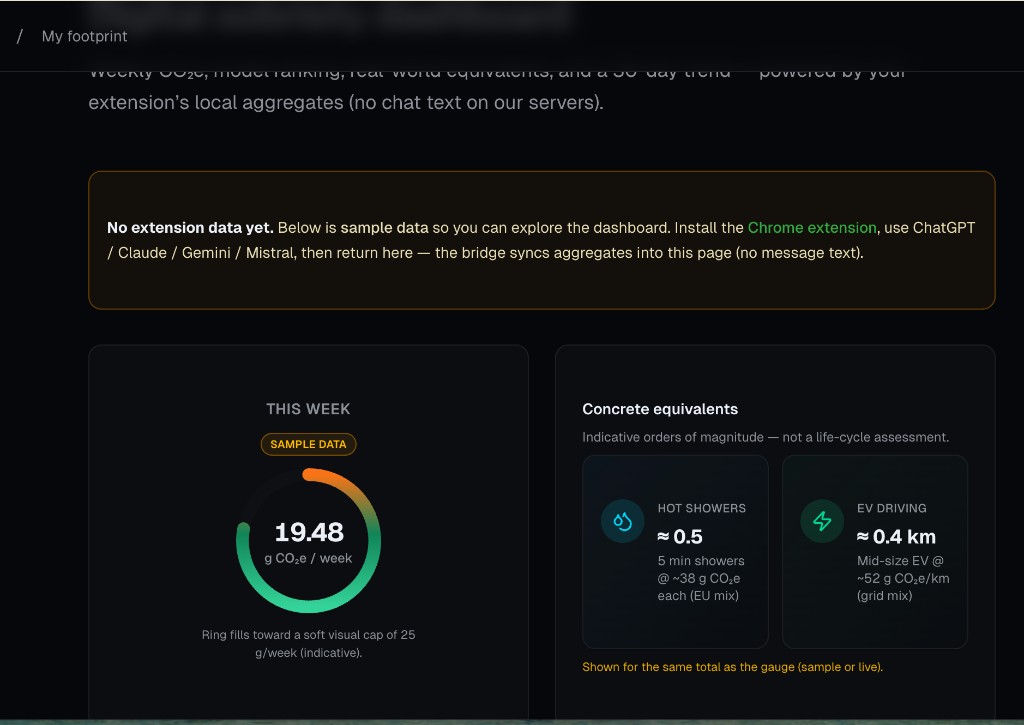
Tableau de bord personnel — optionnel
Tendance 30 jours, jauge hebdomadaire, modèles les plus utilisés et équivalents concrets.
Opérationnel en 2 minutes
Installer en un clic
Ajoutez depuis le Chrome Web Store ou Mozilla Add-ons — sans compte, sans inscription. Fonctionne immédiatement sur ChatGPT, Claude, Gemini, Mistral et Grok.
Chattez normalement
L'extension intercepte les métadonnées de réponse (tokens uniquement, jamais le texte de vos prompts) et estime le CO₂e via notre API publique.
Votre niveau par réponse
Un panneau flottant affiche les grammes de CO₂e, un niveau d'impact lisible et des équivalents concrets instantanément.
Suivre la tendance
Le tableau de bord personnel montre la tendance 30 jours, les modèles les plus utilisés et les équivalents concrets synchronisés depuis votre navigateur.
Tout ce que fait l'extension
En temps réel par réponse
Le CO₂e apparaît dès que chaque réponse se termine — pas de batch, pas de délai.
Vos prompts ne sortent pas
Métadonnées de tokens uniquement. Vos conversations ne sont jamais lues ni envoyées.
Niveau CO₂ lisible
Faible, modéré ou élevé : un signal immédiat du poids de chaque réponse.
Graphique 7 jours en popup
Ouvrez la popup pour voir un graphique à barres de vos 7 derniers jours en un coup d'œil.
Modèles d'éco-prompts
Copiez en un clic des templates de prompts concis pour réduire votre nombre de tokens.
Équivalents concrets
Chaque réponse traduite en km voiture, charges de téléphone, minutes d'ampoule LED.
Tendance 30 jours
Suivez l'évolution de votre usage IA et repérez les modèles qui pèsent le plus.
Vos conversations sont 100 % privées
L'extension lit uniquement les comptages de tokens issus des métadonnées API— jamais le texte de vos prompts ni les réponses de l'IA. Les totaux agrégés sont stockés localement dans votre navigateur. Quand vous ouvrez le tableau de bord Mon empreinte, seuls des totaux anonymes (nom du modèle + grammes) sont synchronisés depuis localStorage — rien ne passe par nos serveurs.
Mesurez votre usage IA aujourd'hui
Installez l'extension gratuitement, chattez normalement, et voyez le CO₂e de chaque réponse sans créer de compte.
Sans carte bancaire · Sans compte pour essayer · Désinstallation en un clic
Pour un suivi serveur (API, Copilot M365, production), voir l'API REST ou la fiche collectivités.
Tu n'es pas encore prêt à installer ?
Reçois un email tous les 15 jours sur les nouveautés extension, providers ajoutés, et l'évolution AI Act / CSRD. Pas de spam, désinscription 1 clic.